
macOS Desktop App + iOS Companion

Index.
Search. Find.

DriveIndex helps you organize, search, and manage your media drives with powerful indexing and advanced metadata extraction. Access your indexed drives from your Mac or browse them on the go with the iOS companion app. Built for filmmakers, photographers, and media professionals.

✓ macOS 12+ ✓ iOS 16+ ✓ Free During Beta ✓ Native Swift App
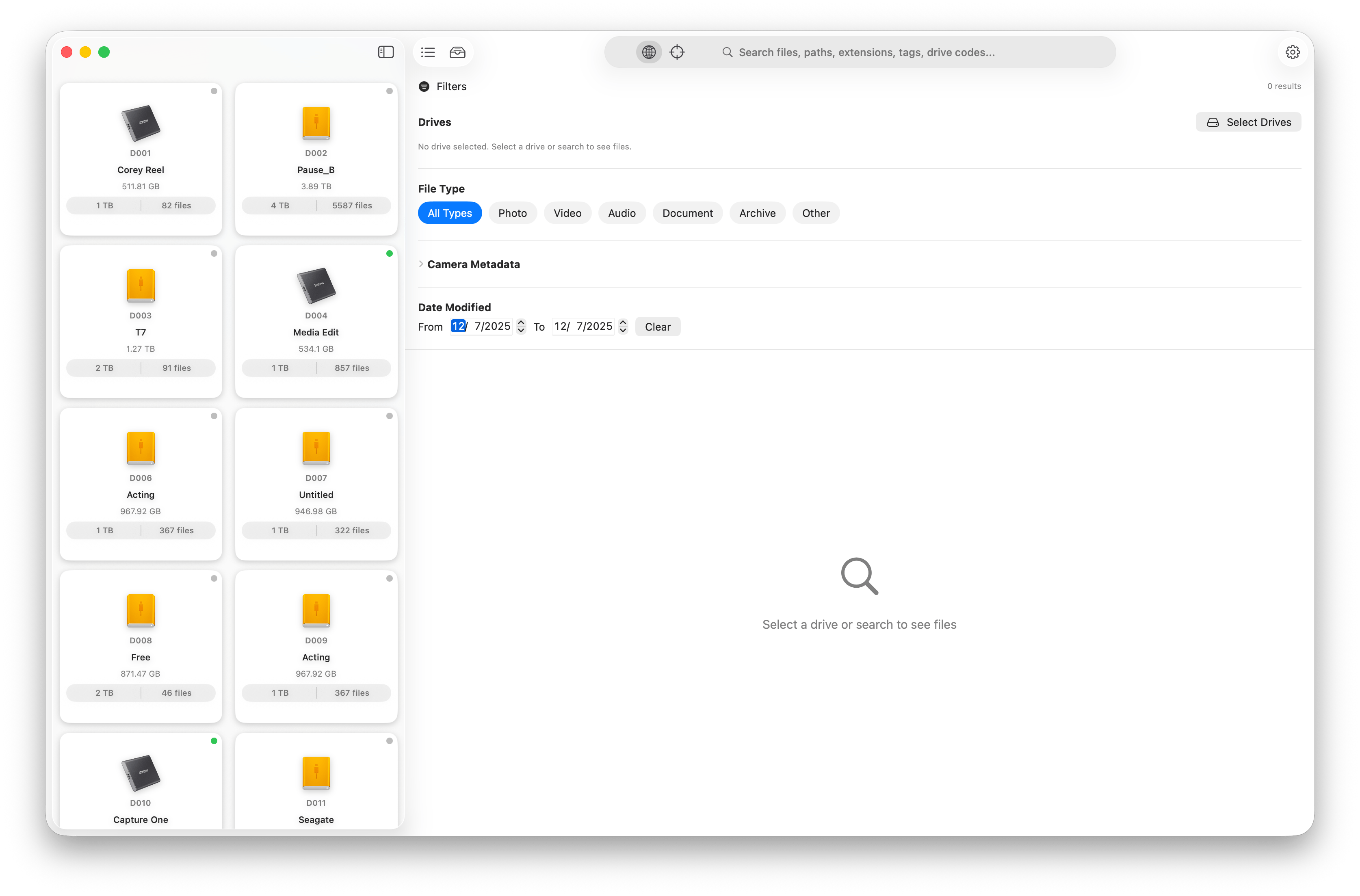
DriveIndex macOS app interface showing drive list with indexed external drives, search functionality, and metadata extraction

Powerful features. Professional workflow.

DriveIndex lives quietly in your menu bar — indexing your drives, extracting metadata, and making your media searchable. Whether you're managing ARRI cinema cameras, RED R3D files, Sony footage, Blackmagic RAW, or photo RAW files, DriveIndex organizes everything.

Fast Search

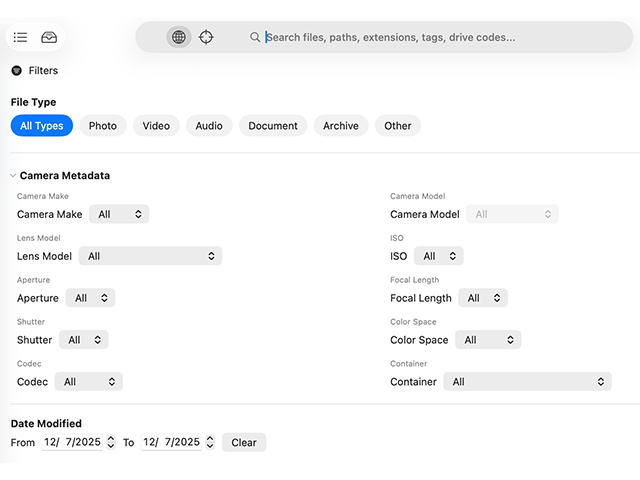
Instantly search across all indexed drives with powerful filtering and metadata-based queries. Find files by camera make and model, lens, resolution, codec, or any metadata field. Search works even when drives are disconnected.

Metadata Extraction

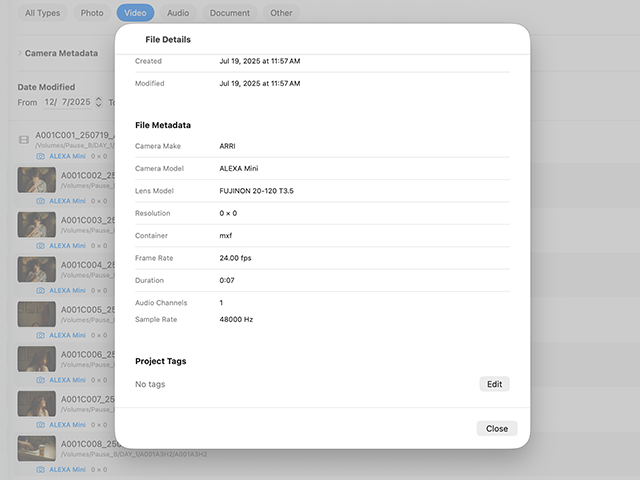
Advanced metadata extraction from ARRI ARI/ARX, RED R3D, Sony MXF, Blackmagic RAW (BRAW), Canon, Nikon, and 30+ professional camera formats. Extract camera settings, lens information, codec details, and technical specifications automatically.

Drive Management

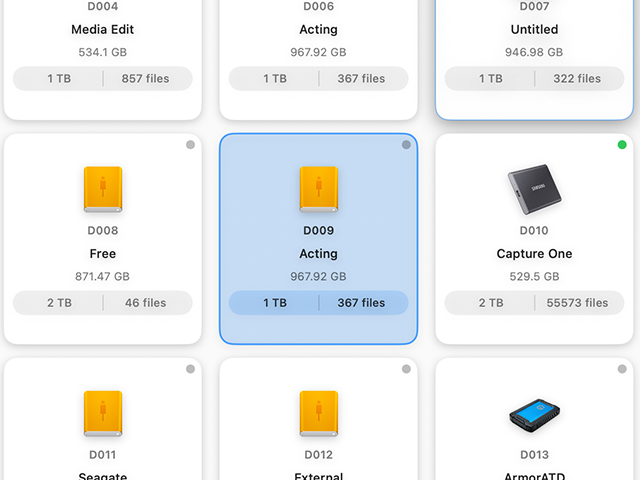
Organize and track your drives with custom labels, tags, and indexing codes for easy identification. Monitor drive capacity and file counts.

Background Indexing

Index drives in the background without interrupting your workflow. Resume indexing automatically when drives are reconnected.

Professional Formats

Native support for ARRI .ari/.arx, RED .r3d, Sony .mxf, Blackmagic .braw, Canon C-series, and standard media files (MOV, MP4, AVI, MKV). Includes 30+ camera RAW formats (CR2, CR3, NEF, ARW, DNG). Comprehensive format coverage for professional video production and photography workflows.

Thumbnail Preview

Visual previews of your media files with intelligent thumbnail caching for quick browsing. See your content at a glance.

How it works

Get organized in minutes. DriveIndex makes drive management simple and powerful.

1

Connect Your Drive

Plug in any external drive, SSD, or hard drive to your Mac.

2

Index in Background

DriveIndex scans your files and extracts metadata automatically while you work.

3

Search Anytime

Find any file instantly, even when drives are disconnected. Search by name, camera, lens, or metadata.

4

Browse on iOS

Access your indexed drives from your iPhone or iPad with the free companion app.

Start Indexing Now

See DriveIndex in action

Watch how DriveIndex simplifies drive management, or explore screenshots of the interface.

Product Demo Coming Soon

Watch how DriveIndex indexes drives, extracts metadata, and enables instant search.

Explore Features

Built for creative professionals

Whether you're shooting ARRI, RED, Sony, or Blackmagic, managing photo libraries, or organizing video archives, DriveIndex adapts to your workflow.

Filmmakers & Cinematographers

Manage ARRI, RED R3D, Sony, and Blackmagic RAW footage across dozens of drives. Search by camera body, lens, resolution, and frame rate. Keep track of which drive contains specific takes or scenes without connecting each drive.

Video Editors & Post-Production

Index client drives before returning them. Search archived projects instantly by codec, resolution, or camera make/model. Find that specific clip across years of backup drives in seconds.

Photographers & Photo Studios

Catalog wedding shoots, commercial sessions, and portrait archives. Search Canon CR2/CR3, Nikon NEF, Sony ARW, and 30+ RAW formats. Filter by camera body, lens, ISO, aperture, or shoot date.

Production Companies & Studios

Manage hundreds of external drives across multiple projects. Print QR labels for physical organization. Let crew members search the entire library from their iPhones without digging through shelves of drives.

Archives & Libraries

Digitize and index legacy media collections. Maintain searchable catalogs of historical footage. Access comprehensive metadata without handling fragile physical media or mounting old drives repeatedly.

Freelancers & Content Creators

Track client deliverables across backup drives. Search YouTube video archives by title, description, or metadata. Find specific b-roll or stock footage from years of shoots without manual searching.

Browse on the go with iOS

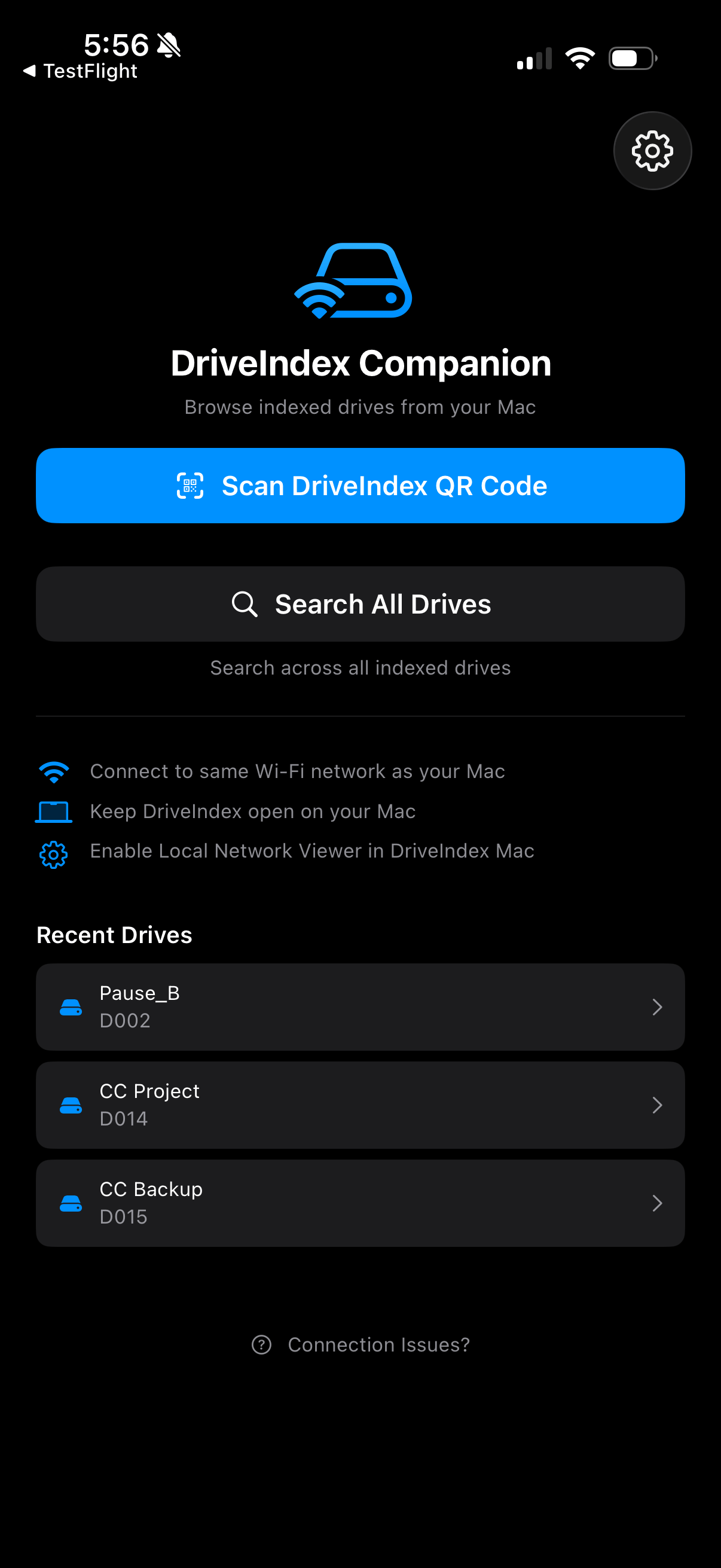
Access your indexed drives from anywhere on your local network with the DriveIndex Companion app for iPhone and iPad.

QR Code Scanning

Print 1"×1" QR labels for your drives and scan them with your iPhone to instantly access your indexed media.

Full Search & Filtering

Search files, filter by metadata, camera make/model, resolution, and date—all from your mobile device.

Thumbnail Streaming

View thumbnails streamed from your Mac for instant visual previews of photos and videos.

Local Network

Automatic discovery via Bonjour—no configuration needed. Works seamlessly on your Wi-Fi network.

Download DriveIndex Companion on the Apple App Store for iPhone and iPad

Free companion app • Requires DriveIndex for macOS

DriveIndex iOS companion app on iPhone showing drive browser with QR code scanning and thumbnail previews
DriveIndex App Icon

Download DriveIndex

Version 0.0.5 • Free During Beta

Requires macOS 14.0 or later • One-time purchase, no subscription

Free During Beta

Signed and notarized by Apple

One-time purchase, no subscription

Free Download free during Beta
  • Background indexing, metadata extraction, fast offline search
  • Lifetime access to DriveIndex
  • Signed and notarized by Apple for macOS 12+
  • No subscription ever required
Pay once. Keep using it — no recurring fees.

Quick Start

  1. Download and open the DMG file
  2. Drag DriveIndex to your Applications folder
  3. Open DriveIndex from Applications (you may need to allow it in System Settings → Privacy & Security)
  4. Connect a drive and start indexing to search your media files

Changelog

Stay up to date with the latest improvements and bug fixes.

v0.0.5 December 20, 2025 Latest

⚡ Lightning-Fast Search + Major Performance Boost

  • Blazing fast startup — DriveIndex now opens in under 500ms (previously 6+ seconds). No more waiting with a spinning beach ball.
  • Smarter search experience — new unified search with simple toggle between "All Drives" and "This Drive" modes. Search your entire library or drill into a specific drive instantly.
  • Search that actually works — fixed critical issues where drive-specific search missed camera metadata (ARRI, RED, Sony, Blackmagic). Now finds files by camera make, lens, codec, and all metadata fields.
  • Snappier filters — filter dropdowns load instantly without freezing the UI. Search results update as you type with improved caching.
  • Rock-solid drive detection — no more permission dialogs on every reindex. DriveIndex remembers your drives correctly across restarts.
  • iOS app improvements — large drives with 50,000+ files now load successfully on iPhone/iPad (previously timed out).
  • More RAW formats — added thumbnail support for 13+ additional camera RAW formats (Kodak, Minolta, Leica, Samsung, Pentax, and more).
See previous releases
v0.0.4 December 14, 2025

🎉 iOS App Launch + License System

  • iOS DriveIndex Companion App — now available on the App Store! Browse your indexed drives from iPhone and iPad with full search, filtering, and thumbnail previews.
  • 7-day free trial — try DriveIndex with full access to all features, no credit card required.
  • License activation — activate your license key to unlock DriveIndex permanently with lifetime updates included.
  • Faster file browsing — large directories with 10,000+ files now load instantly with smart pagination.
  • Improved drive identification — fixed bugs that caused drives to be incorrectly matched, ensuring each drive is uniquely identified.
  • Better window management — fixed window restoration and eliminated duplicate windows when reopening the app.
v0.0.3 December 12, 2025

📱 iOS Companion + Local Network Viewer

  • iOS companion app — brand new DriveIndex Companion app for iPhone and iPad lets you browse indexed drives from anywhere on your local network.
  • QR code labels — generate printable 1"×1" QR labels for drives that encode drive identity and metadata for instant access from mobile.
  • Local network API — built-in Bonjour/mDNS server runs on your Mac, advertising indexed drives to iOS devices on the same Wi-Fi network.
  • Smart camera scanning — ultra-wide camera autofocus and continuous focus adjustments make scanning small labels effortless, even from 2-4 inches away.
  • Thumbnail streaming — cached thumbnails from your Mac stream to iOS for instant visual previews of photos and videos in the mobile browser.
  • Recent drives — iOS app remembers your last 10 scanned drives for quick re-access without rescanning QR codes.
  • Deep link support — scan QR codes with the native Camera app and tap to open drives directly in DriveIndex Companion.
  • Search and filtering — full metadata search and filtering capabilities from iOS, including file type, camera make/model, resolution, and date filters.
  • Secure pairing — access token for secure local network authentication between Mac and iOS devices.
  • App Store ready — privacy-compliant iOS app
v0.0.2 December 8, 2025

🚀 Performance & UX updates

  • Faster indexing and clearer browsing — keeps the UI responsive while you scan drives and adds clearer filter results.
  • Responsive indexing — indexing and metadata extraction now run at utility priority to keep browsing and UI interactions smooth.
  • Smarter filters — ISO, aperture, focal length, and shutter values sort numerically from smallest to largest for quicker selection.
  • View options — added tree view / full list browsing modes so you can scan results the way you prefer.
  • Turbo Mode note — clarifies that enabling Turbo may temporarily raise CPU/I/O during indexing.
  • Telemetry foundation — added diagnostic version tagging to help improve app stability.
v0.0.1 December 2025

🎉 Initial Release

  • Drive Indexing — Index and search across multiple external drives with powerful metadata extraction
  • Metadata Extraction — Advanced extraction from ARRI, RED, Sony, Blackmagic, and standard formats
  • Fast Search — Instantly search across all indexed drives with filtering and metadata queries
  • Drive Management — Organize drives with custom labels, tags, and indexing codes
  • Background Indexing — Index drives without interrupting your workflow
  • Thumbnail Preview — Visual previews with intelligent caching for quick browsing
  • Professional Formats — Support for ARRI .ari/.arx, RED .r3d, Sony, Blackmagic .braw formats
Download Now